Overview
You can't manage what you can't measure. After getting the k3s cluster up and running with Jellyfin, the next logical step was adding proper observability. This post covers setting up a complete monitoring stack: Prometheus for metrics collection, Grafana for visualization, and AlertManager for future alerting capabilities.
Prometheus, Grafana, AlertManager, node-exporter, kube-state-metricsWhy Monitoring Matters
A homelab is a learning environment, which means things will break. Having visibility into what's happening in the cluster - CPU usage, memory consumption, pod states, storage capacity - turns debugging from guesswork into data-driven investigation. Plus, watching resource metrics in real-time is oddly satisfying.
Architecture
This is not the kube-prometheus-stack; everything is wired manually to understand how the pieces fit together:
💻 K3s Cluster (ThinkPad T14) namespaces
 ├─ kube-system
 ├─ monitoring
 │   ├─ node-exporter exposing system data
 │   ├─ kube-state-metrics exposing k8s data
 │   ├─ Prometheus scraping node-exporter and kube-state-metrics
 │   ├─ Grafana Dashboard displaying the data from Prometheus
 │   └─ AlertManager is deployed to validate the wiring, but no alert rules or receivers are defined yet.
 └─ jellyfin

Internal Access: 🔑 SSH
External Access: 🔑 SSH over 🌐 Tailscale
Implementation
Component Deployment
Each component gets its own Kubernetes manifests and its own directory. The stack uses static service discovery - Prometheus is configured to scrape specific internal cluster DNS names:
scrape_configs:
  - job_name: "prometheus"
    static_configs:
      - targets: ["localhost:9090"]
  - job_name: "node-exporter"
    static_configs:
      - targets: ["node-exporter.monitoring.svc.cluster.local:9100"]
  - job_name: "kube-state-metrics"
    static_configs:
      - targets: ["kube-state-metrics.monitoring.svc.cluster.local:8080"]
This approach keeps things simple for now. Service discovery via kubernetes_sd_configs is more dynamic and scales better, but static configs are easier to understand when learning the fundamentals.
Storage Configuration
Like Jellyfin, both Prometheus and Grafana need persistent storage for their data.
I'm using hostPath volumes pointing to directories on the ThinkPad:
Prometheus: /opt/prometheus-data mapped to /prometheus inside the container
Grafana: /opt/grafana-data mapped to /var/lib/grafana inside the container
These aren't the most sophisticated storage solutions, but they work perfectly for a single-node cluster and make backup straightforward - just the local filesystem.
Challenges & Solutions
Challenge #1: Permission Denied
The main hiccup was filesystem permissions. Both Prometheus and Grafana run as non-root users inside their containers (UID 65534 Prometheus, UID 472 Grafana), but the hostPath directories were owned by root with restrictive permissions.
I handled this differently for each component to explore both approaches:
Prometheus: Used an initContainer that runs before the main container starts,
fixing ownership automatically:
initContainers:
  - name: fix-permissions
    image: busybox
    command: ["sh", "-c", "chown -R 65534:65534 /prometheus"]
    securityContext:
      runAsUser: 0
    volumeMounts:
      - name: data
mountPath: /prometheusGrafana: Manually set permissions on the host before deployment:
sudo chown -R 472:472 /opt/grafana-dataBoth approaches work reliably. The initContainer method is more automated and survives cluster rebuilds, while manual permission setting is simpler for initial testing. For production-like scenarios, the initContainer approach is cleaner since it's declarative and self-contained in the manifests.
Challenge #2: Prometheus Pod Restart Loop
After the initial deployment, Prometheus started fine. But when I tried to update the configuration and redeploy to fix the permissions issue, the new pod got stuck in a CrashLoopBackOff while the old pod kept running. The issue: Kubernetes was trying to run two pods trying to mount the same hostPath volume.
The fix was straightforward but taught me an important lesson about StatefulSets vs Deployments:
- Scale the deployment down to 0 replicas:
kubectl scale deployment prometheus --replicas=0 -n monitoring - Wait for the old pod to terminate
- Scale back up to 1 replica
For single-replica stateful applications, this manual scaling dance is sometimes necessary with hostPath volumes. It's a reminder that while Deployments are great for stateless apps, StatefulSets might be worth exploring for components like Prometheus.
What's Working
Prometheus Targets
All three scrape targets are healthy and collecting metrics:
- Prometheus: Self-monitoring
- node-exporter: Hardware metrics (CPU, memory, disk, network)
- kube-state-metrics: Cluster state (pod status, deployments, nodes)
Grafana Dashboard
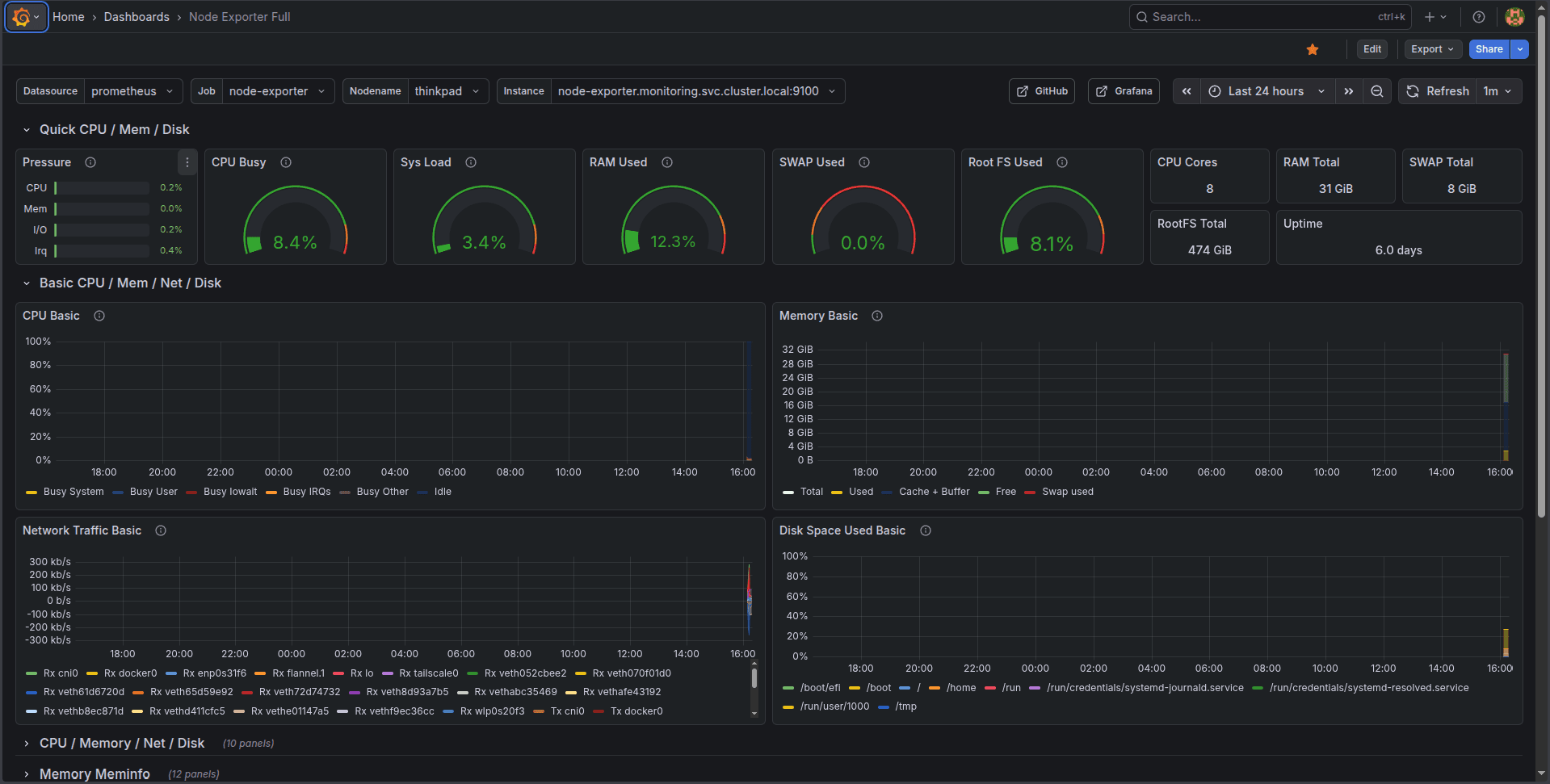
I imported the popular "Node Exporter Full" dashboard as a starting point. It provides comprehensive visibility into the ThinkPad's resources: CPU usage per core, memory breakdown, disk I/O, network traffic, and system load. Watching these metrics in real-time makes it immediately obvious what's happening on the machine.
AlertManager
AlertManager is deployed and running, but not yet configured with any alert rules or notification channels. That's the next step - defining when to get notified about issues and where those notifications should go.
What I Learned
Service Discovery: Understanding how Prometheus finds its targets, both through static configs and the
more sophisticated Kubernetes service discovery mechanisms.
Container Security: Running containers as non-root users is a best practice, but it requires thinking
about filesystem permissions in advance.
StatefulSets vs Deployments: Deployments assume stateless replicas that can be freely created and destroyed.
For stateful applications with persistent storage, that model doesn't always fit cleanly.
Cluster DNS: Kubernetes' internal DNS makes service discovery elegant - service-name.namespace.svc.cluster.local just works.
Next Steps
The monitoring foundation is in place, but there's more to build:
- Homepage: Implement the Homepage service because it looks cool
- Alert Rules: Define meaningful alerts for resource exhaustion, pod failures, and service downtime
- Notification Channels: Configure AlertManager to send alerts somewhere useful (email, Discord, or Slack)
- Custom Dashboards: Build Grafana dashboards tailored to specific services
Having observability in place makes every future addition to the homelab easier to debug and understand. When something breaks - and it will - the monitoring stack will help figure out why.
Series: Building a Production-Grade Lab
- Kubernetes Lab: K3s initial setup
- Adding Observability with Prometheus & Grafana
- GitOps, FluxCD Edition
- Moving toward virtualization and other design decisions
- Manual to Makefile - Terraform, KVM, Ansible
- The Complete Pipeline - End-to-end IaC GitOps
- Implementing SOPS - GitOps secrets management
- Networking Overhaul & Production Migration
- NAS Introduction and More Networking Issues
Resources
The repository is public and available at github.com/kristiangogov/homelab. Feel free to explore the manifests, open issues with suggestions, or reach out if you're building something similar!